Optical Illusion Geometric Ring Vector: A Guide to Precision and Design
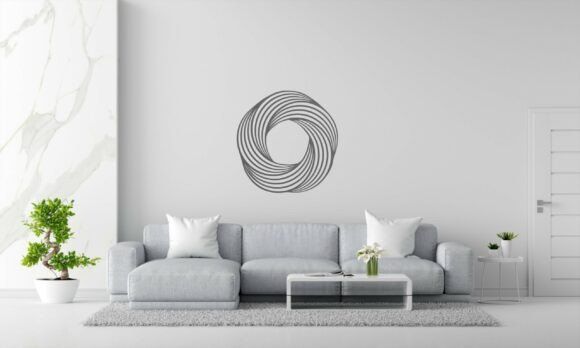
Creating art that appears to move while standing still is a delicate balance of mathematics and aesthetics. The Optical Illusion Geometric Ring Vector achieves this by utilizing intricate, swirling patterns that trick the eye into perceiving depth and motion. For designers, makers, and hobbyists, this digital asset is more than just a pretty image; it is a functional tool for producing captivating wall art, unique gifts, and sophisticated home decor. However, the difference between a stunning finished piece and a frustrating waste of material often lies in how the file is selected, prepared, and executed.
Many enthusiasts dive into laser cutting or CNC machining with high expectations but overlook the technical nuances of vector files. Understanding the specific capabilities of this geometric ring design can save you time, money, and material. This guide explores common pitfalls and offers practical advice to ensure your projects meet professional standards.
Understanding the Versatility of the File Format
One of the most significant advantages of this particular design is its compatibility. The download includes 13 file formats, ranging from industry standards like DXF, SVG, and EPS to specialized formats like STEP and EMF. A common mistake beginners make is assuming all vector files are created equal. They are not. Using the wrong format for your specific machine can lead to poor cut quality, software errors, or lost design details.
For instance, if you are using a laser cutter, the SVG or DXF formats are typically ideal because they preserve clean paths that the machine can follow precisely. Conversely, if you are working with 3D printing or CAD software, the STEP file provides the necessary three-dimensional data. Relying on a raster image like JPG for cutting purposes is a frequent error. While JPGs are useful for previews, they lack the scalable paths required for precision cutting, often resulting in jagged edges or inaccurate dimensions.
Material Selection and Cutting Challenges
The swirling pattern of the optical illusion creates many small, interconnected pieces. This intricacy is what makes the art fascinating, but it also presents structural challenges. A major oversight occurs when creators choose materials that are too brittle or thick for the design’s complexity. Cutting this geometric ring from thin, low-quality paper might result in tearing, while using overly thick acrylic without proper speed settings can cause melting or fusing at the tight curves.
To avoid these issues, consider the following material-specific advice:
- Wood: Use plywood with minimal voids. Hardwoods may splinter at the intricate intersections. Test your power and speed settings on a scrap piece first.
- Acrylic: Ensure your laser lens is clean to prevent heat buildup. Masking the acrylic before cutting helps protect the surface from smoke residue.
- Metal: If using a CNC or plasma cutter, verify that the minimum bridge width in the design exceeds your machine’s kerf width to prevent pieces from falling out prematurely.
By matching the material properties to the design’s demands, you maintain the integrity of the optical illusion. A broken or warped ring fails to create the desired shifting visual effect.
Scaling and Proportion Mistakes
Another area where users often stumble is scaling. Because vectors are resolution-independent, it is tempting to resize the Optical Illusion Geometric Ring Vector to any dimension. However, extreme scaling can distort the visual impact. Shrinking the design too much may cause the intricate swirls to merge visually, losing the illusion of movement. Enlarging it excessively without adjusting line weights can make the piece look sparse and fragile.
Before committing to a final cut, always print a paper prototype at 100% scale. Hold it up against your intended display area. Check if the details remain distinct from a typical viewing distance. If the lines appear to blur together, you may need to adjust the design’s thickness or choose a larger overall size. This simple step prevents the disappointment of hanging a piece that looks muddy or indistinct from across the room.
Software Compatibility and Preparation
Even with versatile file formats, software interpretation can vary. Some programs may auto-close paths or alter node positions during import. This can disrupt the continuous flow of the geometric pattern. To mitigate this, always inspect the file in your chosen software before sending it to the machine. Look for disconnected nodes or overlapping lines that could cause the cutter to make unnecessary passes.
For those using CNC machines, pay close attention to the toolpath generation. The swirling nature of the ring requires smooth, continuous movements. Jerky transitions caused by poor toolpath settings can leave visible marks on the material, detracting from the sleek, modern aesthetic. Using the EPS or PDF files in vector editing software like Adobe Illustrator or Inkscape allows you to clean up any stray points and optimize the path order.
Maximizing Creative Applications
Beyond standard wall art, this design offers endless creative possibilities that are often overlooked. Many users limit themselves to single-layer cuts, but layering different materials can enhance the optical effect. For example, cutting the ring from wood and mounting it on a contrasting colored acrylic background adds depth and shadow, making the illusion more pronounced. Similarly, using translucent materials with backlighting can transform the piece into a striking lamp shade or nightlight.
Entrepreneurs and small business owners should note that this design’s uniqueness makes it an excellent candidate for personalized gifts. Adding names or dates within the negative space of the ring, if modified carefully, can create bespoke items for weddings or anniversaries. However, ensure that any additions do not clutter the primary geometric pattern. The strength of the design lies in its clean, mathematical precision.
Final Checks Before Production
Before you begin your final project, take a moment to review your setup. Verify that your machine’s bed is level and that the material is securely fastened. Double-check the file format matches your software’s requirements. If you are new to this type of intricate work, start with a smaller, less expensive material like cardstock or thin MDF to refine your technique.
The Optical Illusion Geometric Ring Vector is a powerful tool for creators who value both beauty and technical precision. By avoiding common mistakes in file selection, material choice, and scaling, you can produce professional-quality results that truly captivate viewers. Whether you are a DIY enthusiast decorating your home or a professional artist expanding your portfolio, attention to detail is the key to unlocking the full potential of this mesmerizing design.
Remember, the goal is to create a piece that appears to shift and move as the viewer changes their perspective. Achieving this requires a harmonious blend of the right digital file, appropriate material, and careful execution. With these insights, you are well-equipped to turn this digital download into a tangible masterpiece.