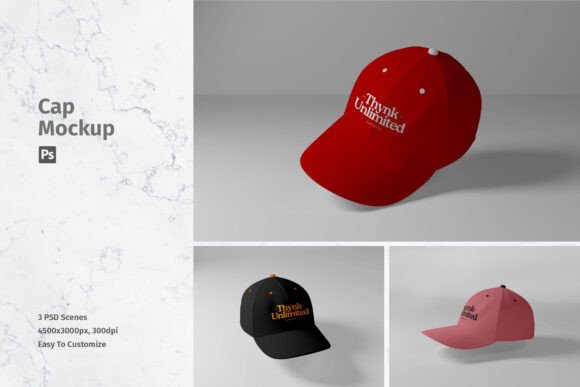
Cap Mockup: A Practical Tool for Professional Design Presentation
In the competitive landscape of graphic design and brand marketing, the gap between a flat digital file and a tangible product is often where client approval is won or lost. Clients and stakeholders rarely visualize how a two-dimensional logo will look on a curved, textured surface without assistance. This is where high-quality mockups become indispensable assets in a designer’s workflow. The Cap Mockup serves as a prime example of such a resource, offering a streamlined method to present headwear designs with realism and precision. By leveraging advanced Photoshop features, this tool allows creators to bypass complex 3D rendering processes while maintaining a professional standard of output.
The primary value proposition of this asset lies in its ability to showcase designs professionally in a realistic 3D display. For freelancers, agency designers, and small business owners, time is a non-renewable resource. Spending hours manually warping logos, adjusting shadows, and matching lighting conditions is inefficient. This mockup eliminates that friction by providing a pre-built environment where the focus remains on the design itself, not the technicalities of presentation. It is not merely a background image; it is a functional workspace designed to integrate seamlessly into existing creative pipelines.
Technical Specifications and Build Quality
When evaluating any digital asset, the technical foundation determines its longevity and versatility. This Cap Mockup is delivered in PSD (Photoshop) format, which remains the industry standard for layered, editable design files. The resolution is set at 4500x3000 pixels with a density of 300 DPI (dots per inch). These specifications are critical for professionals who require print-ready quality or high-resolution displays for large monitors and detailed portfolio pieces. A lower resolution might suffice for social media thumbnails, but it fails when a client requests a close-up view or a printed proof. The high pixel count ensures that textures, stitching details, and fabric weaves remain crisp even when zoomed in.
The package includes three distinct PSD files. This variety is essential for avoiding visual monotony in presentations. Having multiple angles or slight variations in the cap’s positioning allows designers to create comprehensive case studies or product sheets without needing to source additional assets. Each file is structured to support smart-object features, which is the core mechanism that drives the usability of this tool. Smart objects preserve an image's source content with all its original characteristics, enabling non-destructive editing. This means you can replace the current designs with your own within seconds, and if the client requests a change, you can swap it out again without degrading the image quality.
Usability and Workflow Integration
The ease of use is perhaps the most significant strength of this mockup. For those unfamiliar with advanced Photoshop techniques, the learning curve can be steep. However, this asset is designed to be accessible. The smart-object layers are clearly labeled, guiding the user to the exact location where their artwork should be placed. Once the design is pasted into the smart object layer and saved, the main document updates automatically. The software handles the complex calculations required to wrap the flat design around the curved panels of the cap, applying appropriate distortion, perspective, and lighting effects.
This automation does not come at the cost of control. Designers can still adjust opacity, blending modes, and color balances if they wish to fine-tune the integration of their logo with the fabric texture. The inclusion of a help file further supports users who may encounter initial difficulties, ensuring that the tool remains helpful rather than frustrating. It is important to note, however, that photos used in the preview are not included; they are for illustration purposes only. This is a standard practice in the industry to protect intellectual property, but it underscores that the value lies in the template structure, not the sample imagery.
Real-World Applications and Audience Fit
Who benefits most from a Cap Mockup? The audience is broad, ranging from independent apparel brands to large marketing agencies. For entrepreneurs launching a streetwear line, this tool provides a cost-effective way to generate product images before committing to mass production. Instead of ordering physical samples for every colorway and design variation, they can create photorealistic digital proofs. This reduces upfront costs and accelerates the time-to-market for new collections.
Marketing professionals also find significant value in these assets. When pitching a sponsorship deal or a promotional campaign involving branded merchandise, a realistic visualization helps stakeholders understand the final impact. A flat logo on a white background lacks emotional resonance; the same logo on a well-lit, textured cap evokes a sense of lifestyle and utility. Bloggers and content creators in the fashion or design niche can use these mockups to illustrate articles about branding trends, providing readers with clear, high-quality visuals that enhance engagement.
Educators and trainers in graphic design courses can utilize this resource to teach students about presentation standards. It demonstrates how proper mockup usage elevates perceived value and professionalism. Even serious hobbyists who design caps for local sports teams or community events can achieve a polished look that rivals professional agencies, boosting their credibility and confidence.
Strengths and Limitations
The strengths of this Cap Mockup are evident in its efficiency and quality. The 300 DPI resolution ensures versatility across digital and print media. The smart-object functionality saves hours of manual labor, allowing for rapid iteration during the design phase. The inclusion of three different files adds flexibility, enabling designers to show multiple views or create dynamic layouts. The realistic 3D display helps bridge the communication gap between designer and client, reducing misunderstandings and revision cycles.
However, there are limitations to consider. As a PSD file, it requires Adobe Photoshop. Users relying solely on free or alternative software like GIMP or Canva may find it incompatible or difficult to edit without losing the smart-object benefits. Additionally, while the mockup is highly customizable regarding the design placed on the cap, the base model of the cap itself is fixed. You cannot change the style of the cap, such as switching from a baseball cap to a beanie, within this specific package. If a project requires diverse headwear types, additional mockup packs would be necessary.
Another consideration is the lighting environment. While the mockup provides realistic lighting, it is static. If a brand has strict guidelines requiring specific lighting angles or color temperatures that differ from the mockup’s setup, extensive photo editing skills may be needed to adjust the overall tone. Nevertheless, for the majority of standard presentation needs, the default lighting is neutral and professional enough to suit most branding guidelines.
Long-Term Value and Conclusion
Investing in high-quality mockups like this Cap Mockup is a decision that pays dividends over time. Unlike stock photos that may become dated or overused, a well-constructed mockup template remains relevant as long as the product type exists. The ability to reuse the file for countless projects makes it a cost-effective addition to any designer’s library. It enhances the perceived professionalism of your work, helping to justify higher rates or secure client approvals more quickly.
In summary, this item is suitable to showcase your designs professionally in a realistic 3D display. It balances technical robustness with user-friendly features, making it accessible to both seasoned professionals and emerging creators. By simplifying the presentation process, it allows designers to focus on what they do best: creating compelling visual identities. Whether you are preparing a pitch deck, updating an online store, or building a portfolio, this tool offers a reliable, efficient, and polished solution for presenting cap designs. Its combination of high resolution, smart-object ease, and versatile file options makes it a practical choice for anyone serious about visual communication in the apparel industry.