Breast Cancer Awareness Digital Paper: A Guide to High-Quality Creative Use
When you are working on a project that carries emotional weight, such as those supporting breast cancer research or survivorship events, the quality of your materials matters. The Breast Cancer Awareness Digital Paper is more than just a background image; it is a tool for communication. Whether you are designing invitations for a charity gala, creating custom merchandise for a fundraiser, or simply making a personal scrapbook to honor a loved one, the visual elements you choose set the tone. However, many creators overlook the technical and aesthetic nuances of digital assets, leading to results that look amateurish or fail to print correctly.
Understanding how to properly select and apply these digital resources can save you time, money, and frustration. This guide explores common pitfalls when using seamless patterns and offers practical advice to ensure your final product is both beautiful and functional.
Understanding Resolution and Print Quality
One of the most frequent mistakes beginners make is ignoring resolution requirements. You might find a pattern online that looks crisp on your computer screen, but when you send it to a printer, the result is pixelated and blurry. This happens because screens typically display images at 72 DPI (dots per inch), while professional printing requires at least 300 DPI.
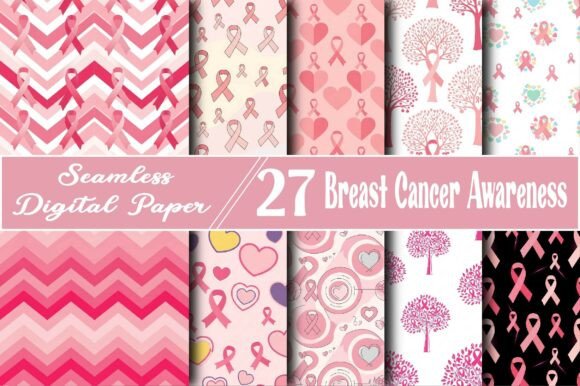
The Seamless Breast Cancer Awareness Digital Paper discussed here is provided as a high-resolution 300 DPI JPG. This specification is critical. If you attempt to use a low-resolution file for large-format prints like banners or pillowcases, the image will break apart into visible squares. Always check the DPI before purchasing or downloading. If the seller does not specify 300 DPI, assume it is not suitable for physical products. For digital-only uses, such as social media backgrounds, lower resolutions may suffice, but having a high-quality master file gives you the flexibility to scale down without losing clarity.
The Importance of Seamless Patterns in Design
A "seamless" pattern means the image tiles perfectly without visible edges or breaks. Many designers new to digital crafts do not realize the difference between a standard image and a seamless tile. If you try to wrap a non-seamless image around a tumbler or a candle label, you will see an obvious vertical line where the image starts and ends. This disrupts the visual flow and looks unprofessional.
Using a truly seamless design allows for endless repetition. This is particularly useful for:
- Sublimation graphics: Wrapping designs around mugs, phone cases, and tumblers requires a pattern that flows continuously.
- Fabric printing: When creating personalized pillows or tote bags, the fabric roll needs a pattern that repeats naturally.
- Wallpaper and backgrounds: For websites or room décor, a seamless tile ensures the design covers the entire area without awkward cuts.
Before applying the pattern, test it in your design software by duplicating the layer and placing it side-by-side. If you can spot the seam, the file may not be truly seamless, or you may need to adjust the offset settings in your editing tool.
Color Accuracy and Symbolism
The pink ribbon is an iconic symbol, but not all shades of pink convey the same message. Some digital papers use neon or pastel pinks that may not align with the traditional awareness color. Additionally, colors look different on various screens. A vibrant pink on your monitor might print as a dull rose on paper if your printer’s color profile is not calibrated.
To avoid disappointment, always order a test print if you are producing physical goods in bulk. For digital projects, consider how the pink interacts with other elements. If you are overlaying text, ensure there is enough contrast. A busy pattern with bright ribbons can make white text hard to read. In such cases, use a semi-transparent shape behind the text or choose a section of the pattern with more negative space.
Licensing and Usage Rights
A critical aspect often overlooked is the license attached to the digital download. Many creators assume that buying a digital paper allows them to resell the pattern itself or use it in unlimited commercial products without restriction. This is rarely the case. Most digital papers come with a Personal Use license or a limited Commercial Use license.
For example, you might be allowed to use the Breast Cancer Awareness Digital Paper to create and sell finished physical items like greeting cards or tote bags. However, you likely cannot redistribute the JPG file as part of a digital template pack or sell it as stock art. Always read the terms of service. Misunderstanding these rights can lead to legal issues and account suspensions on platforms like Etsy or Amazon KDP. If you plan to use the design for corporate event packaging or large-scale merchandise, verify that the license covers commercial distribution.
Versatility Across Projects
The true value of a high-quality digital paper lies in its versatility. Instead of buying separate designs for every small project, a single seamless pattern can serve multiple purposes. Consider how this specific design integrates into various creative avenues:
- Event Decorations: Use the pattern for party tableware, napkins, or backdrop walls for awareness walks and galas.
- Personalized Gifts: Apply the design to soap labels, candle wrappers, or bookmarks for thoughtful, handmade gifts.
- Digital Media: Utilize it as a stylish background for websites, social media posts, or presentation slides to maintain brand consistency during October and beyond.
- Stationery and Planning: Incorporate the pattern into planner decorations, notebook covers, or wedding invitations for a subtle touch of support.
By mastering one versatile asset, you streamline your workflow. You do not need to search for new graphics for each item; instead, you focus on layout and composition.
Best Practices for Implementation
To get the most out of your digital paper, follow these practical steps:
First, organize your files. Keep the original high-resolution JPG in a dedicated folder. Do not edit the original file directly; instead, work on copies. This preserves the integrity of the source material for future projects.
Second, check compatibility. Ensure your design software supports high-resolution JPGs. Programs like Adobe Photoshop, Illustrator, Canva, and Procreate handle these files well, but some basic online editors may compress them upon upload, reducing quality.
Third, consider the end-user experience. If you are making items for survivors or patients, think about comfort and durability. For printable fabric, ensure the ink is washable and safe. For digital backgrounds, ensure the file size is optimized for fast loading on websites.
Finally, add personal touches. While the pattern is beautiful on its own, combining it with meaningful quotes, names, or dates makes it unique. Use the ribbons as framing elements rather than just a background. This approach elevates the design from a simple pattern to a heartfelt message.
Choosing the right Breast Cancer Awareness Digital Paper involves more than picking a pretty pink image. It requires attention to resolution, seamlessness, color accuracy, and licensing. By avoiding common mistakes and understanding the technical details, you can create professional, impactful projects that honor the cause and delight your audience. Whether you are a seasoned designer or a hobbyist starting your first DIY craft, these principles will help you achieve better results and make the most of your creative resources.